
Air to Air Heat Pump Systems Troubleshooting
IDS/IDP Screenings are available for Error Codes.
Code ATL
Code ATL
Tools Needed
Refrigerant gauges
Digital multi-meter
Error Code Information
| Models |
BOVA BOVB BOVC BOVD |
| Error Code | ATL |
| Error Code Meaning |
Ambient Temperature Limited Cooling (T4>=125 F or T4<15 F) Heating (T4>=86 F or T4<-4 F) |
| Possible Causes |
Thermostat not programmed to energize reversing valve in heating Power to B wire outside when calling for cooling (calls for Y only) |
Troubleshooting Steps
Step 1. Check ambient temperature.
- With the unit in an idle state for at least 5 minutes, confirm ambient temperature display on control board is close to outdoor temps (within 10 degrees).
- If code is stuck on display, remove Y wire from outdoor unit and cycle power through disconnect. You will now see the outdoor temps on the display.
Results:
- If the ambient temperature on the control board display is not within 10 degrees of the actual ambient temperature, replace the T4 sensor. The part number can be found in the Aftermarket Resource Center.
- If above 125° F in cooling mode, wait until temps go below 125° F.
- If below 15° F in cooling mode, wait until temps gets above 15° F.
- If above 86° F in heating mode, wait until temps drop below 86° F.
- If below -4° F in heating mode, wait until temps raise above -4° F.
- If ambient temperature is between the above values, go to step 2.
Step 2. Checking programming in thermostat.
- Make sure the thermostat is programmed to energize the reversing valve with a call for heat.
Results:
- If the reversing valve is set to energize on cool, have the tech switch to energize on heat.
- If this programming is correct, go to step 3.
Step 3. Check low voltage wiring connected to outdoor unit from thermostat.
- Check voltage from B wire to C wire at outdoor unit.
Results:
- If energized from B to C (18-28 VAC), and trying to cool, remove B wire. Unit will now switch to cooling and a trained professional needs to trace back why it’s getting energized.
- If not energized from B to C (18-28 VAC), and trying to heat, with settings in thermostat confirmed correct, the issue is a bad wire or thermostat and should be replaced.
Code C3/C4
Code C3/C4
Tools Needed
Digital multi-meter
Error Code Information
| Models |
BOVA BOVB BOVC BOVD |
| Error Code | C3 / C4 |
| Error Code Meaning |
The condenser coil sensor improperly seated. (T3<T4-3° F for ten minutes) |
| Possible Causes |
Wrong location of T3 sensor Faulty T3 or T4 sensor T3/T4/T3L sensors are 10K Example: 77 degrees sensor should read 10,000 OHMS |
Troubleshooting Steps
Step 1. Check location of T3 sensor.
- Sensor should be located on the outdoor coil, below and to the left of the control board on a "U" bend.
Results:
- If it is not located below and to the left of the control board, locate the sensor connection on the board and follow the wires to the sensor so they can relocate it.
- If the sensor is in the right place, go to step 2.
Step 2. Check the T4, T3 and/or T3L temperature sensor.
With the machine in an idle state for at least 5 minutes, go to the checks in the Parameters Menu to look at the sensor readings for T3 and T4. They should both be within 10 degrees of the outside temperature.
Results:
- If any of the sensors is not within 10 degrees of the outside temperature, or either one is reading 32 when it shouldn't, that sensor needs to be replaced. The part number can be found in the Aftermarket Resource Center.
- If the control board cannot view the parameters menu, go to step 3.
Step 3: Measuring sensor resistance
- T3/T4/T3L sensors are 10k sensors. Example: 77 degrees sensor should read 10,000 OHMS
- Disconnect each sensor in turn from the control board.
- Using a digital multi-meter set to K ohms, set the probes on the sensor side of the wire connections and use the chart in the manual to compare the ohm reading with the temperature reading.
Note:
- Measure sensor resistance T3, T3L, T4, (T3L only for IDP and 15, 20 SEER IDS models).
- 18 SEER will only have T3 sensor.
- 15, 20 SEER and IDP Packaged units will have T3 and T3L, so test both.
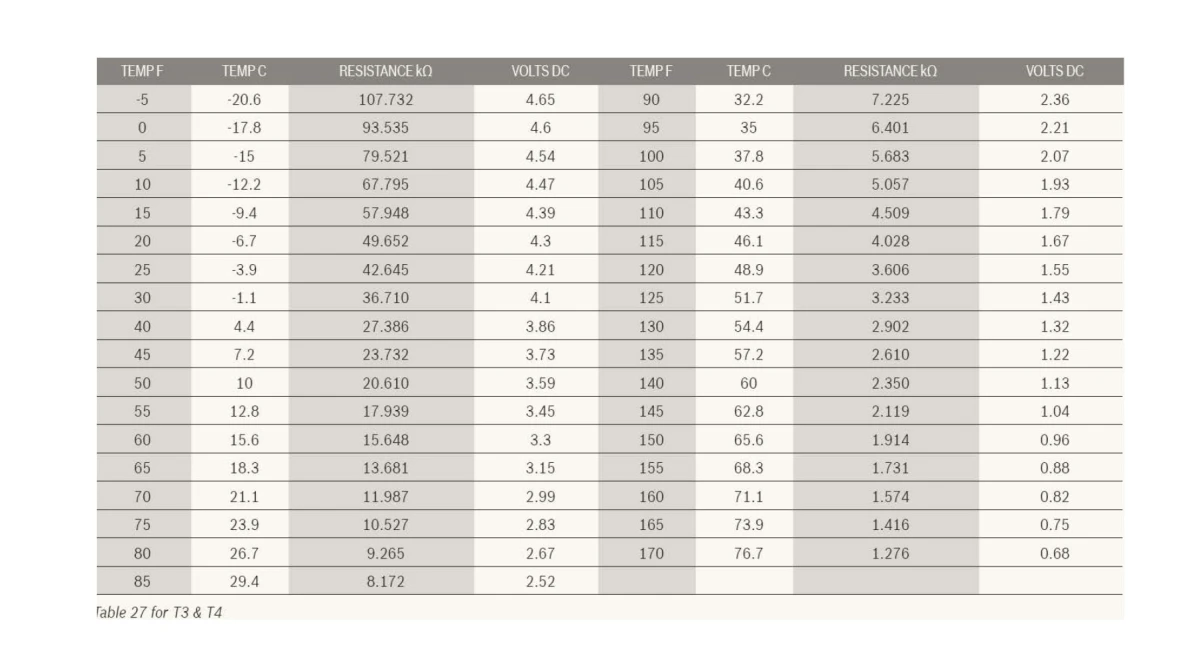
Results:
- If the sensor ohm reading doesn't match the temperature reading, replace that sensor. The part number can be found in the Aftermarket Resource Center.
- If everything tests OK, contact the Bosch technical support specialists.
Code E4
Code E4
Tools Needed
Digital multi-meter
Error Code Information
| Models |
BOVA BOVB BOVC BOVD |
| Error Code | E4 |
| Error Code Meaning |
Temperature sensor fault. Sensors T3, T3L, T4, T5, or TF are out of range |
| Possible Causes |
Broken wire to temp sensor Failed sensor Poor connection to board |
Troubleshooting Steps
Step 1. Locate the error.
- Where is the code: On the screen or in the parameter point checks?
Results:
- On the screen, does it say E4 and then a sensor name?
- If yes, the sensor name is the failed sensor. The part number can be found in the Aftermarket Resource Center to get a replacement.
- If no, go to step 2.
Step 2. Checking parameter point checks after the unit has been idle for at least 5 minutes.
- If the parameter point checks are able to be accessed, use the checks to find which sensor is out of range.
Results:
- If one of the sensors (T3, T3L, T4, T5, TF) is over 10 degrees away from ambient temperature or reporting a 32°F, it is a faulty sensor. The part number can be found in the Aftermarket Resource Center.
- If the parameter point checks are not able to accessed, remove the Y wire form the outdoor unit and cycle power so the display goes blank.
- Attempt the checks again.
- If a sensor is over 10 degrees away from ambient temperature or reporting a 32°F, it is a faulty sensor. The part number can be found in the Aftermarket Resource Center.
- If the parameter point checks still can't be accessed, shut off power to the unit and go to step 3.
- Attempt the checks again.
Step 3. Check the T3, T3L, T4, T5 and TF temperature sensors.
NOTE:
- 18 SEER will not have T3L sensor.
- 15, 20 SEER and IDP Packaged units will have T3L sensor only.
- Please use the wiring diagram located on the inside of the control board panel for the appropriate unit to locate where the sensors connect to the control board. Some sensors will have a plastic disconnect that, once separated, you can place the metal prongs for the sensor side of the connection as test points for the probes on you meter. Other sensors will need to be disconnected from the board itself.
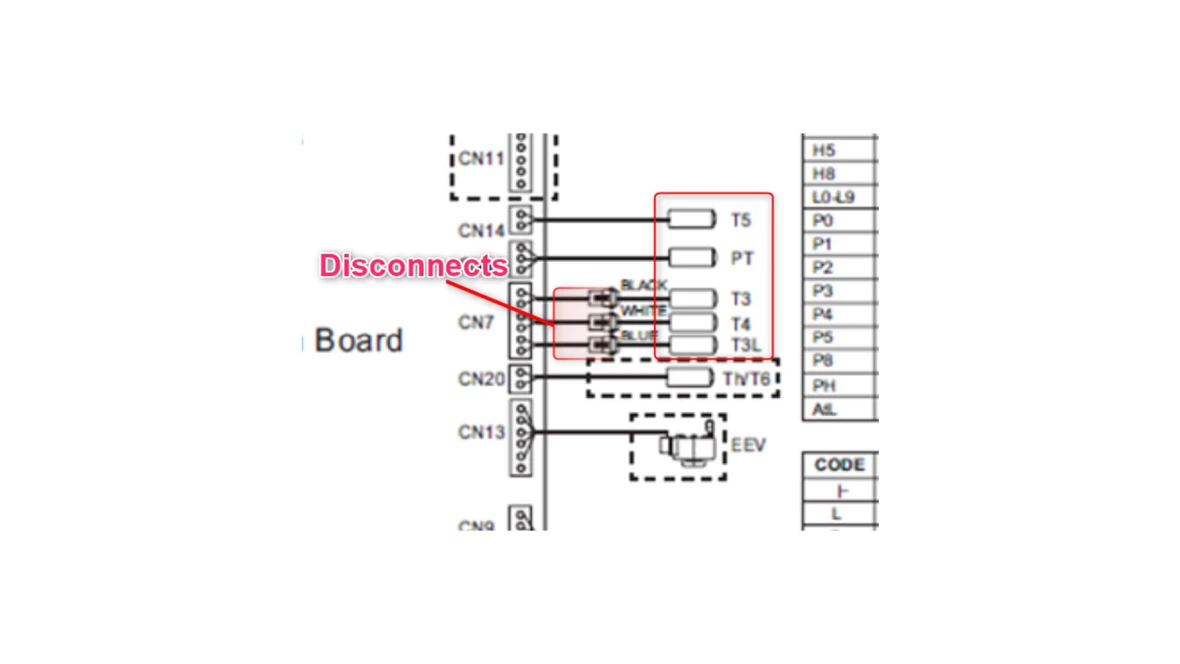
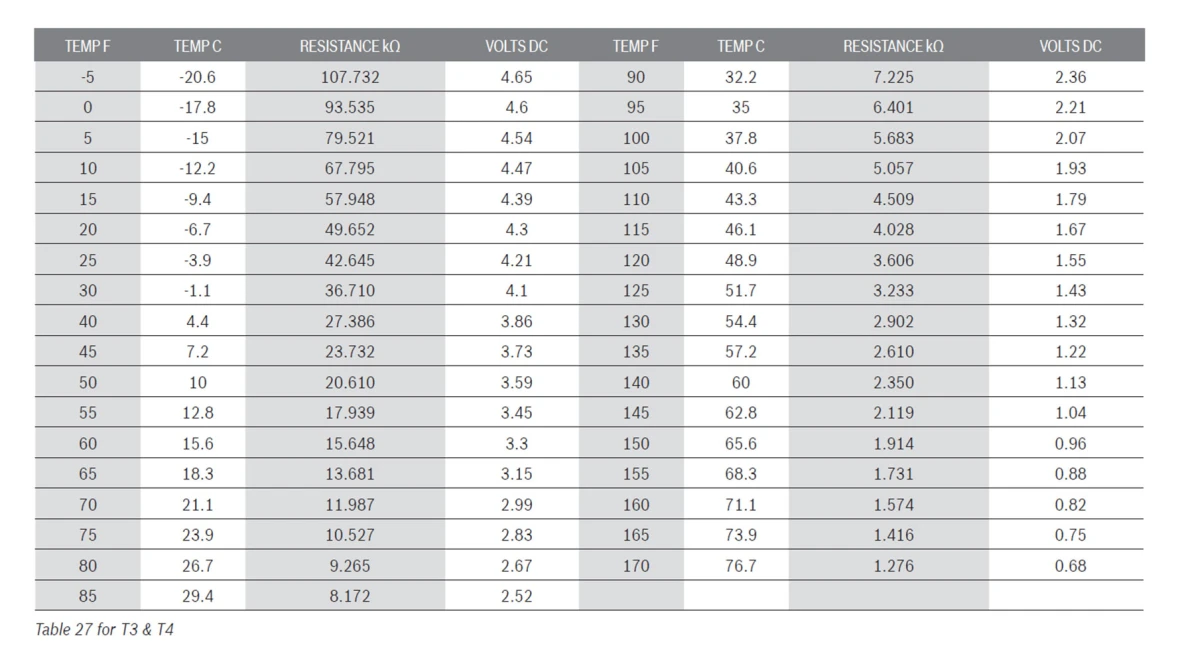
- T3/T4/T3L sensors are 10k sensors. Example: 77 degrees sensor should read 10,000 OHMS
- Use the chart in the manual to compare the ohm reading with the temperature reading.
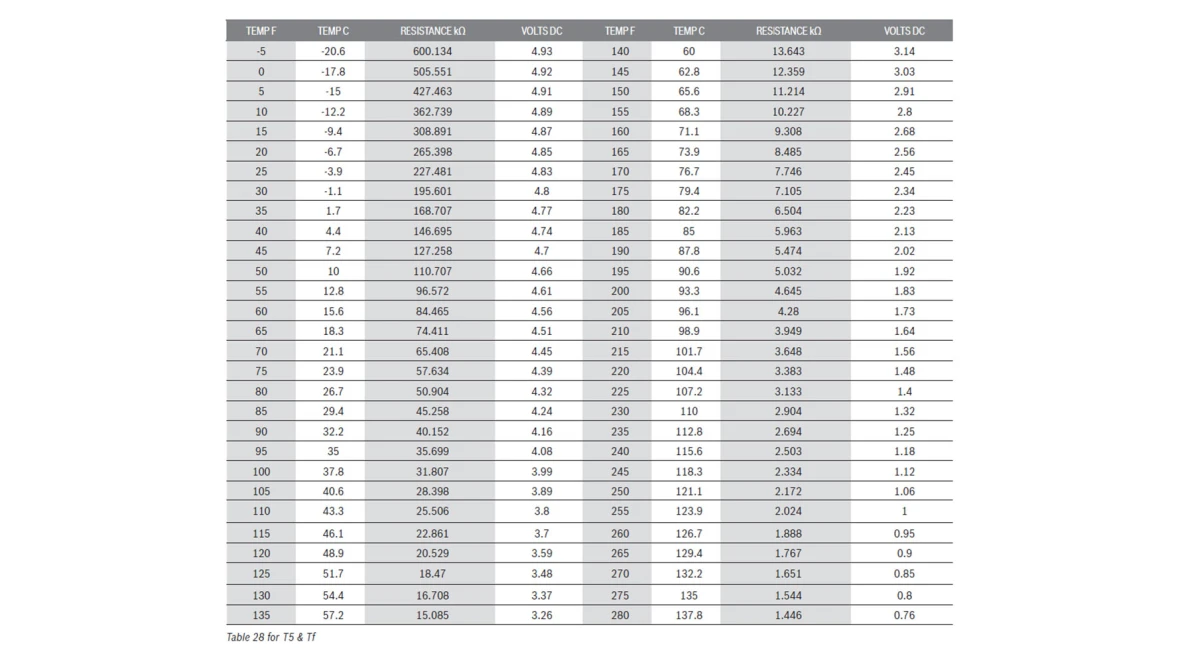
- T5/TF Sensors are 5K sensors. Example: 77 Degrees sensor should read 54,841 OHMS
- IDP Plus package unit 15 SEER 2/3/5 Ton 24,000 BTU’s/36,000 BTU’s/60,000 BTU’s
Results:
- If the sensor's ohm reading doesn't match up compared to the temperature reading: replace the specific temperature sensor. The part number can be found in the Aftermarket Resource Center.
- If the sensor's ohm reading does match up compared to the temperature reading, contact the Bosch technical support specialists.
Code E5
Code E5
Tools Needed
Digital multi-meter
Error Code Information
| Models |
BOVA BOVB BOVC BOVD |
| Error Code | E5 |
| Error Code Meaning |
High/low voltage protection. This code will appear whenever power is cycled. (>=270V "E5”) (<260 and >=210 Normal operation) (<190 and >=180 Max 50HZ) (<172V "E5") |
| Possible Causes |
Incorrect supply power or wiring issue Disconnect recently pulled |
Troubleshooting Steps
Step 1. Check power supply, part 1
- Test for volts A/C across L1 and L2.
Results:
- If power reading isn't in range (172-270 VAC +/- 10%) there is a problem with power supply to the unit. Have a trained professional check for power supply to the unit.
- If the power reading is in range, go to step 2.
Step 2. Checking power supply, part 2
- Test for volts A/C from L1 to ground.
- Test for volts A/C from L2 to ground.
Results:
- If the power reading is 120 VAC (+/- 10%), go to step 3.
- If the power reading is not 120 VAC (+/- 10%), there is a power supply issue. Have a trained professional check for power supply to the unit.
Step 3. Check low voltage
Voltage reading should be between 18-28 volts A/C for all models across Y and C for cooling. Across C to Y, and C to B for heating. Note: "C" is not energized, it's used as a test terminal for digital multi-meters. DO NOT connect or jump anything to C.
- Remove the thermostat from the wall and remove the wires landing on R, Y and G
- Test the voltage on R wire by touching a lead to R and a lead to a common.
Results:
- If the voltage reading is 24 VAC (+/- 10%), then R is energized. Go to step 4.
- If the voltage reading is not 24 VAC (+/- 10%), a technician needs to check the transformer in the air handler and the condition of the wires.
Step 4. Supply power to the condenser
- At the thermostat with R being energized, put all three wires (R, Y, and G) in a wire nut to force voltage from R to Y and G, which should start the condenser and indoor fan.
Results:
- If the condenser starts, this confirms there is a bad thermostat situation.
- If it still does not work, they have a bad wiring situation.
- Once this step is complete, put the wires back into their original positions.
Code E6
Code E6
Tools Needed
Digital multi-meter
Error Code Information
| Models |
BOVA BOVB BOVC BOVD |
| Error Code | E6 |
| Error Code Meaning |
DC fan motor fault |
| Possible Causes |
Control board not outputting correct DC/AC volts to fan motor or faulty fan motor. Fan blade damaged or blocked - Extreme weather conditions (wind) |
Troubleshooting Steps
5 Wire Troubleshooting
Step 1. Measure Pin resistance
- Power Off unit and wait 3 minutes
- Unplug wire harness and measure resistance between the pins on the fan plug (+/-10%). See wiring diagram for plug location.
- Pins Red - Black = .543 - .663 M OHMS
- Pins White - Black = 41 – 51 K ohms
- Pins Yellow - Black = 36 – 44 K ohms
- Pins Blue - Black = greater than 10 Mega ohms or OL.
Results: Do the values match?
- YES - go to Step 2. Plug in wiring harness and turn power back on.
- NO - Fan motor is out of range and needs to be replaced, the part number is available in the Aftermarket Resource Center. Plug fan motor back in and go to step 2 to confirm correct power from the control board.
Step 2. Measure DC Voltage
- Give call for heat/cool through the thermostat.
- Measure the DC Voltage on the control board (Red - Black), should read 370-385VDC
- Measure the DC voltage on the control board (White - Black), should read 14-18VDC
- Measure the DC Voltage on the control board (Yellow - Black), should read 1.9-5.1VDC
Results:
- If voltages are not in range, replace the control board.
- If all are within range, just replace the fan motor.
3 Wire - H,L, Com Troubleshooting
Step 1. Measure Pin resistance
- Power Off unit and wait 3 minutes
- Unplug wire harness and measure resistance between the pins on the fan plug (+/-10%). See wiring diagram for plug location.
- Pins Black - Yellow/Orange = 40 to 44 OHMS
- Pins Blue - Yellow/Orange = 90 to 94 OHMS
Results: Do the values match?
- YES - go to Step 2, reconnect the wiring harness and turn power back on.
- NO - Fan motor is out of range and needs to be replaced, the part number is available in the Aftermarket Resource Center. Plug fan motor back in and go to step 2 to confirm correct power from the control board.
Step 2. Measure VAC Voltage
- Give call for heat/cool through the thermostat.
- Measure the VAC Voltage (Black - Yellow), should read 187-253 VAC
- Measure the VAC Voltage (Blue - Yellow), should read 187-253 VAC
Results:
- There should only be voltage on one of the pairs, not both.
- If voltages are not in range but ohms are, replace the control board.
- If the voltages are within range but the ohms are not, replace the motor.
- If both voltage and ohms are out of range, replace both the motor and board.
- If all are within range, advise to restart system. If the error comes back, replace the fan motor.
- NOTE: All part number are available in the Aftermarket Resource Center.
3 Wire - W2, U2, V2 Troubleshooting
Step 1. Measure Pin resistance
- Power Off unit and wait 3 minutes
- Unplug wire fan harness (CN32) and measure resistance between the pins on the three silver connectors of the fan plug. Should read 25-40k ohms (+/-10%) across all pairings.
Results: Do the values match?
- YES - go to Step 2, reconnect wiring harness and turn power back on.
- NO - Fan motor is out of range and needs to be replaced, the part number is available in the Aftermarket Resource Center. Plug fan motor back in and go to step 2 to confirm correct power from the control board.
Step 2. Measure AC Voltage
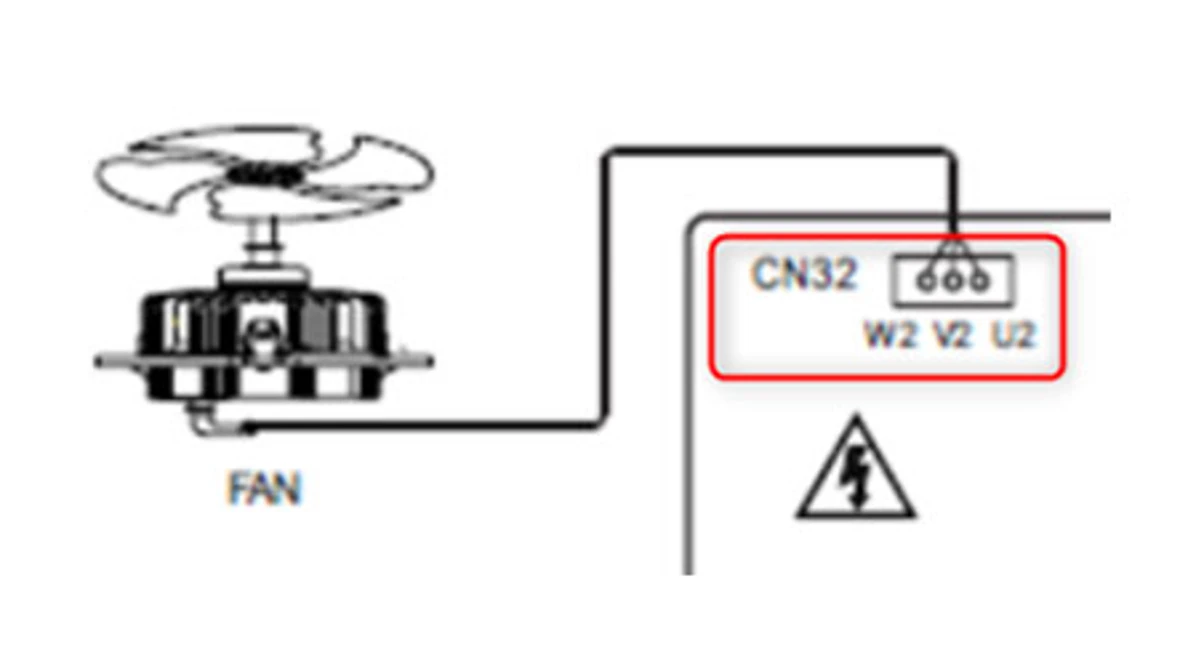
- Give call for heat/cool through the thermostat.
- Measure the AC Voltage from board (U2 – V2) should be between 60 – 250 VAC
- Measure the AC voltage from board (V2 – W2) should be between 60 – 250 VAC
- Measure the AC Voltage from board (W2 – U2) should be between 60 – 250 VAC
Results: Do the values match?
- There should only be voltage on one of the pairs, not both.
- If voltages are not in range but ohms are, replace the control board.
- If the voltages are within range but the ohms are not, replace the motor.
- If both voltage and ohms are out of range, replace both the motor and board.
- If all are within range, advise to restart system. If the error comes back, replace the fan motor.
- NOTE: All part number are available in the Aftermarket Resource Center.
Code E7/C5
Code E7/C5
Tools Needed
Digital multi-meter
Error Code Information
| Models |
BOVA BOVB BOVC BOVD |
| Error Code | E7 |
| Error Code Meaning |
Compressor discharge sensor seat fault (T5) (T5<T3-5 F for 10 min in cooling) or (T5<TC-9 F for 10 min in heating) |
| Possible Causes | T5 plug is not inserted properly, System experiencing high discharge temperatures |
Troubleshooting Steps
Step 1. Check sensor reading
- Make sure the unit is not running, then pull the power disconnect and wait for the display to go blank.
- Remove the T5 sensor connection from the board and then reconnect it to the board.
- Go in the parameters menu to see what the T5 sensor is reporting.
Results:
- If the T5 sensor reading in the parameters is similar temperatures to other sensors, T3 and T4,
- contact the Bosch technical support specialists.
- If the T5 sensor reading is reporting a "32" or far off from the other sensors, T3 and T4, replace
- the T5 sensor. The part number is available in the Aftermarket Resource Center.
- If the unit will not allow you to go through the parameters menu, power down the unit and go to step 2.
Step 2. Ohm out the sensor
- Remove the T5 sensor connection from the board and measure ohms across the silver connectors of the sensor wire Molex connection using a digital multimeter.
- T5/TF Sensors are 5K Example: 77 Degrees sensor should read 54,841 OHMS
- Use the chart in the manual to compare the ohm reading with the temperature reading.
Results:
- If the ohm reading (+/- 10%) is out of range from the temperature reading, replace the T5 sensor.
- If the ohm reading (+/- 10%) is within range from the temperature reading, contact the Bosch technical support specialists.
Code E9
Code E9
Tools Needed
Digital multi-meter
Error Code Information
| Models |
BOVA BOVB BOVC BOVD |
| Error Code | E79 |
| Error Code Meaning |
EEPROM fault |
| Possible Causes |
There could be a strong interference from electricity grid. System will recover when electricity grid is normal. Failed EEPROM chip in board. |
Troubleshooting Steps
Step 1.
- Check power reading at L1 and L2 using a digital multi-meter (should be between 180-253 VAC).
Results:
- If power is within range and the code has not cleared, replace the control board. The part number can be found in the Aftermarket Resource Center.
Verify incoming power
Code Eb
Code Eb
Tools Needed
Digital multi-meter
Error Code Information
| Models |
BOVA BOVB BOVC BOVD |
| Error Code | Eb |
| Error Code Meaning |
System lockup, 2 times (E6) protection in 10 minutes. |
| Possible Causes | Control board not outputting correct AC/DC volts to fan motor or faulty fan motor. |
NOTE: This code will only come up with very early models. Please use the IDS / IDP - E6 Error Code troubleshooting steps.
Code F5/HB
Code F5/HB
Tools Needed
Refrigerant gauges
Digital multi-meter
Error Code Information
| Models |
BOVA BOVB BOVC BOVD |
| Error Code | Hb |
| Error Code Meaning |
High pressure protection in Heating (PT) |
| Possible Causes | Possible fault in fan, system over charge, air flow restriction or faulty high-pressure switch. |
Troubleshooting Steps
S tep 1. Check air filter.
This would be field installed on the indoor unit only. The contractor should be able to locate it. Bosch does not supply any air filters.
- Is air filter clean?
Results:
- If no, replace the air filter and restart the system.
- If yes, continue to step 2.
Step 2. Check service valves.
- Are the service valves fully open?
Results:
- If no, fully open the valves.
- If yes, go to step 3.
Step 3. Checking the outdoor fan motor on the condensing unit.
- Is it running?
Results:
- If no, proceed to test fan (see E6 code).
- If yes, go to step 4.
Step 4. Checking the condensing coil.
- Is the coil clean?
Results:
- If no, clean the outdoor unit.
- If yes, go to step 5.
Step 5. Confirm temperature through the sensors in an idle state.
- Ensure there isn't a call for heat/cool. This can be done either by removing the y wire from the outdoor unit, or just stopping the call from the stat itself
- Go into the parameters menu on the control board and see what the temperature reading is for the T3, T4, and T5 sensors.
Results:
- Compare the temperature readings of the T3, T4, and T5 sensors. Are they all in a similar range?
- If yes, go to step 6.
- If no, replace the sensor that is out of range. The part number is available in our Aftermarket Resource Center.
Step 6: Checking high pressure switch. Use the IDS and IDP Wiring Diagrams for location reference.
- Power down the unit and remove the HPS connection from the board.
- Using a digital multi-meter set for standard ohms, check ohms across the wires.
Results:
- If the ohm reading is OL, equal or greater than 1, replace the high pressure switch. The part number is available in our Aftermarket Resource Center.
- If it is not OL, equal or greater than 1, contact the Bosch technical support specialists.
Code H0
Code H0
Tools Needed
Digital multi-meter
Error Code Information
| Models |
BOVA BOVB BOVC BOVD |
| Error Code | H0 |
| Error Code Meaning |
Communication fault in main control chip. Board Fault, EEPROM in Backwards, EEPROM Poor Connection |
| Possible Causes |
There could be a strong interference form electricity grid. System will recovery when electricity grid is normal. Failed EEPROM chip. |
Troubleshooting Steps
Step 1. Verify incoming power
- Check power reading at L1 and L2 using a digital multi-meter (should be between 180-253 VAC).
Results:
- If power is within range and the code has note cleared, replace the control board. The part number can be found in the Aftermarket Resource Center.
Code H8
Code H8
Tools Needed
Refrigerant gauges
Digital multi-meter
Error Code Information
| Models |
BOVA BOVB BOVC BOVD |
| Error Code | H8 |
| Error Code Meaning | Pressure transducer fault (PT) |
| Possible Causes |
Bad Pressure Transducer Bad Control Board |
Troubleshooting Steps
Step 1. Checking wiring (with power off)
- Is the pressure transducer (PT) wired correctly?
Results:
- If no, correct the wiring.
- If yes, go to step 2.
Step 2. Checking suction pressure through the parameters menu on the control board and compare to manual gauges.
- Ensure there isn't a call for heat/cool. This can be done either by removing the y wire from the outdoor unit, or just stopping the call from the thermostat itself.
- Is the suction pressure on the field gauges is within 50 PSI (+/- 10%) of check point No. 9/10 (cooling/evaporator pressure) or No.10/12 (heating/condensing pressure)? NOTE: The check point number may be different depending on model. Refer to manual or the back of the cover of the unit for details.
Results:
- If the parameters check points show a 14 or a 505 and its has been confirmed there is a charge in the system; or if the pressure reading of the field gauges is more than 50 PSI (+/- 10%) of the check point reading, the transducer needs to be replaced. The part number can be found in our Aftermarket Resource Center.
- If the parameters check point show something other than a 14 or 505, got to step 3.
Step 3. Checking transducer voltage
- Using a digital multi-meter, check for volts DC from the white to the black wire going to the transducer.
Results:
- If the white to black wire reads 4.9-5.1 VDC, replace the transducer. The part number can be found in our Aftermarket Resource Center.
- If it reads out of that range, contact the Bosch technical support specialists.
L0 through L9 Code
L0 through L9 Code
Tools Needed
Digital multi-meter
Error Code Information
| Models |
BOVA BOVB BOVC BOVD |
| Error Code | L0 through L9 |
| Error Code Meaning | The IPM module protection (the same as P6, only for analysis). |
| Possible Causes |
Failed control board Failed compressor |
Troubleshooting Steps
Step 1. What error code are you seeing?
- Make note of the error code and go to step 2.
Step 2. Check line voltage
- Check for VAC from L1/L2.
Results:
- Should be between 180-253 VAC
- If not within range, contact an electrician.
- If good, go to step 3.
Step 3. Checking system pressure.
- There are two ways to confirm if the system pressure is correct while using the pressure chart found in the manual:
- Use the parameters menu to check points 9 and 10.
- Use manual gauges to get the liquid and vapor pressure readings.
Results:
- If pressure readings are not correct, adjust the refrigerant accordingly.
- If pressure readings are correct, go to step 4.
Step 4. Have there been any storms in the area?
- Make note in of any storms in the area recently. Go to step 5.
Step 5. Check for a grounded compressor
- Pull the disconnect at the outdoor unit and let the board power down. Wait 2 minutes to confirm board is de-energized.
- Once de-energized, remove the compressor wires from the board.
- With a digital multi-meter set to Continuity, place one probe on a wire from the compressor and the other probe to a ground connection. Complete this for all three wires from the compressor.
Results:
- If any of the three wires did or did not show continuity to ground, make note of this and go to step 6.
Step 6. Check compressor wires for ohms.
- Using a digital multi-meter set to standard ohms, measure ohms across all three wire connections on the compressor connector: U to V, U to W, W to V.
- Make note of these readings and go to step 7.
Step 7. Checking compressor voltage
- With the compressor still disconnected from the board, turn power back on to the unit.
- Use the thermostat to make a call for heat/cool.
- Once the fan motor starts slowing down, use a digital multi-meter to check voltage across the compressor connection pins on the board: U to V, U to W, W to V.
Results:
- Make note of the voltage readings and contact the Bosch technical support specialists.
No display on control board
No display on control board
Tools Needed
Digital multi-meter
Error Code Information
| Models |
BOVA BOVB BOVC BOVD |
| Error Code | None, display is blank |
| Error Code Meaning | N/A |
| Possible Causes |
Failed control board Failed compressor Are fuses on board open |
Troubleshooting Steps
Step 1. Check line voltage
- Check for VAC from L1/L2
Results:
- If not between 180-253 VAC, contact an electrician.
- If between 180-253 VAC, go to step 2.
Step 2. Isolating the board from components
- Pull the disconnect and power down the unit. Wait 2 minutes to confirm board is de-energized.
- Remove the compressor, fan motor, crankcase heater and pressure transducer connections from the board.
- Restore power to the unit.
Results:
- Make note if the display does or does not return and contact the Bosch technical support specialists.
Code P0/F4
Code P0/F4
Tools Needed
Digital multi-meter
Error Code Information
| Models |
BOVA BOVB BOVC BOVD |
| Error Code | P0 |
| Error Code Meaning | High outdoor coil temp, T3 sensor |
| Possible Causes | Failed outdoor sensor |
Troubleshooting Steps
Step 1. Is the heat sink and outdoor unit clean? The heat sink is in the unit, behind the control board.
- If no, clean the heat sink and/or outdoor unit.
- If yes, continue to step 2.
Step 2. Checking parameters menu after the unit has been idle for at least 5 minutes.
- With the unit in an idle state, go into the parameters menu and confirm what the Tf and T3 sensor are reporting for temperature.
Results:
- If either sensor is far out of range from the ambient temperature, or showing 32 when it shouldn't, replace the sensor (or control board depending on the age of unit) that has the incorrect reading. The part number can be found in our Aftermarket Resource Center.
- If all of the temperature readings are in a similar range, go to step 3.
Step 3. Confirming fan motor runs
- Start up the unit with a call from the thermostat.
Results:
- If the fan motor does not start, go to the E6 troubleshooting steps.
- If the fan motor does start, contact the Bosch technical support specialists.
Code P1/F1
Code P1/F1
Tools Needed
Refrigerant gauges
Digital multi-meter
Error Code Information
| Models |
BOVA BOVB BOVC BOVD |
| Error Code | P1 |
| Error Code Meaning | High pressure switch protection (HPS). |
| Possible Causes | Possible fault in fan, system over charge, air flow restriction or faulty high-pressure switch. |
Troubleshooting Steps
Step 1. Ensure the ambient air temperature around the unit is below 125 degrees F.
- If above 125, it's not an issue with the unit. Wait until the temperature comes down.
- If below, continue to step 2.
Step 2. Is the outdoor unit coil is clean? They can spray it down with a hose or use non-acidic chemicals.
- If no, clean the outdoor unit coil, reset the unit.
- If yes, go to step 2.
Step 3. Is the air filter clean? This would be field installed on the indoor unit only. The contractor should be able to locate it. Bosch does not supply any air filters.
- If no, replace the filter in the indoor unit.
- If yes, go to step 4.
Step 4. Check to see if high pressure switch is open.
- Find the only sensor with 2 yellow wires (labeled has "HPS" on the wiring diagrams). This is the connection for the high pressure switch.
- Using a digital multi-meter set to standard ohms, disconnect the HPS wire connection and put the probes on the pressure switch side of the connection.
Results:
- If not 0 - 0.5 ohms, its a bad high pressure switch. You can recommend the tech jump out the switch to verify. If they do this, make sure they put the switch back in place.
- If 0 - 0.5 ohms, the pressure switch is good, go to step 5.
Step 5. Checking the system pressure
- With the system in an idle state, connect the field gauges to the unit.
- Look in the parameters menu to made sure the board is reading the pressures within 50 psi of the gauges.
Results:
- If the pressure readings are not within 50 PSI of field gauges, replace the pressure transducer. The part number can be found in our Aftermarket Resource Center.
- If the pressure readings are within 50 PSI of field gauges, contact the Bosch technical support specialist.
Code P2/H5
Code P2/H5
Tools Needed
Refrigerant gauges
Digital multi-meter
Error Code Information
| Models |
BOVA BOVB BOVC BOVD |
| Error Code | P2 |
| Error Code Meaning |
Low pressure protection in cooling (PT). <44 PSI for 5 Min in cooling. >=117 F Discharge Super Heat for 5 min in heating |
| Possible Causes |
Poor heat exchange on coil (cooling mode – indoor coil, heating mode outdoor coil) Fan motor failure (cooling mode – indoor fan, heating mode – outdoor fan) Service valves not open Filter dryer or TXV restricted Unit is under charge Faulty pressure transducer reading (refer to P2 code) |
Troubleshooting Steps
Step 1. Verify service valves are fully open.
- If no, have the caller open them and power cycle the unit.
- If yes, go to step 2.
Step 2. Are the indoor and outdoor coils clean?
The air filter on the indoor coil would be field installed and the
contractor should be able to locate it. The outdoor coil can be sprayed clean with a hose or they can use a nonacidic cleaner.
- If no, have the caller clean both indoor and outdoor coils.
- If yes, go to step 3
Step 3. Checking indoor blower.
- Start the unit with a call from the thermostat.
- See if the indoor blower is running.
Results:
- If the motor is not working on the indoor unit and it's a Bosch air handler, contact the Bosch technical support specialists.
- If the motor is not working on the indoor unit and it's a non-Bosch air handler, contact the manufacturer of the indoor unit for troubleshooting assistance.
- If the indoor unit is working, go to step 4.
Step 4. Test pressure transducer.
- Refer to H8 code procedure to test the pressure transducer.
Code P3/H3
Code P3/H3
Tools Needed
Refrigerant gauges
Digital multi-meter
Error Code Information
| Models |
BOVA BOVB BOVC BOVD |
| Error Code | P3 |
| Error Code Meaning |
Compressor over current protection. (>11A-3T 15A-5T for 60 sec Current HZ will be the limit) (<10.5A-3T 14A-5T for 30 sec resume normal operation) (>11.5A-3T 15.5A-5T for 15 sec Current HZ will be reduced 2HZ) (>15A-3T 20A-5T Shutdown "P0") |
| Possible Causes |
Indoor motor stopped abnormally/ dirty indoor coil, Heating mode Poor heat exchange on outdoor unit (cooling mode) dirty coil on outdoor unit Service valves are not open fully/ TXV or filter dryer restriction Overcharged Control board or compressor issue Outdoor air temp above 125 degrees F |
Troubleshooting Steps
Step 1. Verify service valves are fully open.
- If no, open them and power cycle the unit.
- If yes, go to step 2.
Step 2. Are the indoor filter and outdoor coil clean?
- If no, replace the indoor filter and/or clean the outdoor coil.
- If yes, go to step 3
Step 3. Make sure the outdoor fan is working.
- If the outdoor fan is not working, go to E6 code procedure.
- If it is working, go to step 4.
Step 4. Check ambient air temperature.
- If air temperature is above 125 degrees, wait for the air to cool down.
- If air temperature is below 125 degrees, contact the Bosch technical support specialists.
Code P4/H6
Code P4/H6
Tools Needed
Refrigerant gauges
Digital multi-meter
Error Code Information
| Models |
BOVA BOVB BOVC BOVD |
| Error Code | P4 |
| Error Code Meaning |
High compressor discharge temperature protection (T5). (T5>194 Current HZ will be the limit) (T5<185 resume normal operation) (T5>212 for 30 sec Current HZ will be reduced 2HZ) (T5>230 Shutdown "P4") |
| Possible Causes |
Incorrect refrigerant charge. TXV/EEV/filter dryer restriction Under charged (check charge in FORCE mode) 10- degree subcooling +/- 2 degrees Service valves do not open fully Indoor motor stopped Dirty outdoor coils Dircty indoor filter |
Troubleshooting Steps
Step 1. Check ambient air temperature.
- If air temperature is above 125 degrees, wait for the air to cool down.
- If air temperature is below 125 degrees, go to step 2.
Step 2. Verify service valves are fully open.
- If no, have the caller open them and power cycle the unit.
- If yes, go to step 23.
Step 3. Are the indoor filter and outdoor coil clean?
- If no, have the caller clean both indoor and outdoor units.
- If yes, go to step 4.
Step 4. Make sure the outdoor and indoor fan are working.
- If the outdoor fan is not working, go to E6 code procedure.
- If indoor fan is not working, check for 240 VAC going into the fan.
- If no 240 VAC into the fan, transfer to tier 2.
- If it is working, go to step 5.
Step 5. Check the T5 temperature sensor after the unit has been idle for at least 5 minutes.
- Go into the parameters menu and check the temperature reading of "Compressor discharge temp".
Results:
- If the sensor reading is more than 50 degrees away from outdoor temperature, replace the T5 sensor. The part number is available in the Aftermarket Resource Center.
- If the sensor reading is within 50 degrees of the outdoor temperature, contact the Bosch technical support specialists.
Code P5
Code P5
Tools Needed
Refrigerant gauges
Digital multi-meter
Error Code Information
| Models |
BOVA BOVB BOVC BOVD |
| Error Code | P5 |
| Error Code Meaning |
Condenser coil temperature protection in cooling (T3). (T3>135 Current HZ will be the limit) (T3<130 resume normal operation) (T3>137 for 30 sec Current HZ will be reduced 2HZ) (T142>142 for 3 sec Shutdown "P5") |
| Possible Causes |
Failed T3 sensor Test and check T3 sensor Outdoor condenser coil blocked Incorrect refrigerant charge or faulty TXV Service valve not fully open |
Troubleshooting Steps
Step 1. Verify service valves are fully open.
- If no, open them and power cycle the unit.
- If yes, go to step 2.
Step 2. Are the outdoor coil and indoor filter clean?
- If no, have both indoor and outdoor units cleaned.
- If yes, go to step 3
Step 3. Make sure the outdoor fan is working.
- Start a call from the thermostat.
- Check to see if the outdoor fan is working.
Results:
- If the outdoor fan doesn't work with a call from the thermostat, go to E6 code procedure.
- If it is working, go to step 4.
Step 4. Check ambient air temperature.
- If air temperature is above 125 degrees, wait for the air to cool down.
- If air temperature is below 125 degrees, go to step 5.
Step 5. Checking parameters menu after the unit has sat idle for at least 5 minutes.
- With the unit in an idle state, go into the parameters menu and confirm what the T3, T4 and T5 sensors are reporting for temperature.
Results:
- If any sensor is far out of range from the ambient temperature, or showing 32 when it shouldn't, replace the sensor that has the incorrect reading. The part number can be found in our Aftermarket Resource Center.
- If all of the temperature readings are in a similar range, go to step 6.
Step 6. Checking system charge
- In the parameters menu, check the "Evaporating pressure" and "Condensing pressure". The exact menu option will vary depending on the model. Consult the owner's manual or the chart on the inside of the control board panel for specifics.
Results:
- If the result is "14" or "505" on any of the checks, use pressure gauges to confirm what the charge in the system is.
- If the system is low or "flat", find where the leak is and repair.
- If the result is something other than "14" or "505", reference the pressure & temperature chart (field supplied) to compare ambient air temp with system pressure by using pressure gauges to confirm correct charge.
- If the pressure is more than 100psi off from the chart, the charge needs to be corrected.
- If the system charge is within 100psi of the P&T chart, go to step 7.
Step 7. Checking transducer voltage
- Using a digital multi-meter, check for volts DC from the red to the black wire going to the transducer.
Results:
- If the red to black wire reads 4.9-5.1 VDC, replace the transducer. The part number can be found in our Aftermarket Resource Center.
- If it reads out of that range, contact the Bosch technical support specialists.
Code P6/H4
Code P6/H4
Tools Needed
Refrigerant gauges
Digital multi-meter
Error Code Information
| Models |
BOVA BOVB BOVC BOVD |
| Error Code | P6 |
| Error Code Meaning | The IPM module protection. |
| Possible Causes |
Control board failed Compressor failed Incidental power issue Services are not valve open System issue – charge, air flow (check air filter) |
Troubleshooting Steps
Step 1. Checking the services valves are open.
- If no, open the service valve and power cycle the unit.
- If yes, go to step 2.
Step 2. Checking if the indoor filter and outdoor coil are clean.
- If no, replace the indoor filter and/or clean the outdoor coil.
- If yes, go to step 3.
Step 3. Check if the unit is currently running.
- If the unit is currently running with no issues, it could have been a incidental power supply
- issue. Let the unit continue to run and note any further issues. If the unit is not currently running, there will be an error code. Contact the Bosch technical support specialists.
Code P8
Code P8
Tools Needed
Digital multi-meter
Error Code Information
| Models |
BOVA BOVB BOVC BOVD |
| Error Code | P8 |
| Error Code Meaning | DC fan motor typhoon protection (high winds) |
| Possible Causes |
Control board failed Condenser fan failed Incidental power issue High wind area? |
Troubleshooting Steps
Step 1. Confirm if high wind area.
- Has there been high winds or a high wind event recently.
- If no, follow the E6 troubleshooting questions.
- If yes, wait for winds to die down and see if the code returns.
Code PH/HH
Code PH/HH
Tools Needed
Refrigerant gauges
Digital multi-meter
Error Code Information
| Models |
BOVA BOVB BOVC BOVD |
| Error Code | PH |
| Error Code Meaning |
Low discharge superheat protection. Discharge superheat <9 F for 40 minutes |
| Possible Causes |
EEV failed Poor heat exchange indoor unit (cooling mode) air filter or fan speed Poor heat exchange outdoor unit (heating mode) dirty outdoor unit of outdoor fan failure Unit is over charged |
Troubleshooting Steps
Step 1. Verify indoor filter and outdoor coil are clean.
- If no, replace indoor filter and/or clean outdoor coil.
- If yes, go to step 2.
Step 2. Check the T5, T3 and/or T3L temperature sensor.
- After the unit has sat idle for at least 5 minutes, go into the parameters menu and see what the
- reading is for the T3 and/or T3L sensor.
Results:
- If the sensor reading is more than 50 degrees away from outdoor temperature, replace the specific temperature sensor. The part number is available in the Aftermarket Resource Center.
- If the sensor reading within 50 degrees of the outdoor temperature, contact the Bosch technical support specialists.
(ECM) Constant Airflow Motor Troubleshooting
(ECM) Constant Airflow Motor Troubleshooting
NOTE: During testing, Motor access panel should be closed.
- Check for 24V between R & C on ECM board.
- Move FAN switch to ON at thermostat. Check for 24V at G & C (should be the same as R & C) terminals on ECM board. If no voltage is present from G to C, please review thermostat or thermostat wires.
- Check High voltage at ECM motor harness circuit. If no voltage is present, ensure that high voltage is present to the unit. For 208/230V at L1 & L2 (black and white wire), for 265/277V at L1 & N (must be within 10%).
- Check 16 pin harness connection and continuity for each wire. If there is any pin that doesn’t have continuity, change the harness.
- On the ECM Interface board set the adjust pin to test while verifying that G to C has 24 volts. If the motor doesn’t start, replace the ECM motor. If the motor starts, replace the ECM Interface Board.